Platform Science announced four new fleet management apps—PS Command Center, PS Coach, PS Truck Tracker, and Vehicle Settings—designed to give dispatchers real-time operational visibility, enable scalable safety coaching, provide customers with delivery tracking, and allow administrators direct control over in-cab video settings from the back office.
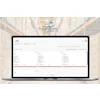
- PS Command Center provides dispatchers a single real-time dashboard showing dispatch status, driver hours of service, vehicle locations, and arrival data to eliminate time spent hunting across reports
- PS Coach enables safety managers to coach thousands of drivers at scale with permanent time-stamped acknowledgment records, supporting self-guided coaching, live sessions, and DOT audit compliance
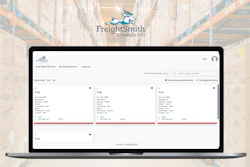
- PS Truck Tracker generates secure, self-expiring links for customers and receiving docks to track single vehicle locations in real-time without login requirements, reducing dispatcher call volume
- Vehicle Settings gives fleet administrators self-service control to adjust safety detection sensitivity and privacy configurations without requesting changes from Platform Science
- All four products address specific back-office pain points identified directly from customer conversations about operational inefficiencies
Platform Science announced four new products in its PS Fleet app suite: PS Command Center, PS Coach, PS Truck Tracker, and Vehicle Settings for PS Visual Intelligence.
These new capabilities enable fleets to identify operational problems earlier, scale safety coaching across large driver rosters, share delivery visibility with customers, and take direct control of in-cab video settings – all from the back office.
“Every one of these products started with a conversation with a customer about where their back office was losing time,” says Darrin Demchuk, SVP of product, Platform Science. “Dispatchers were fielding ‘where’s my truck?’ calls, safety managers were coaching thousands of drivers with spreadsheets, and admins were waiting on us to change a camera setting. With this release, we’re putting real-time visibility and direct control in the hands of the people running the fleet, so they can act on problems before they reach the customer or the road.”
Key takeaways:
· PS Command Center: Available within PS Fleet Manager and integrated with a fleet’s existing dispatch software, PS Command Center gives dispatchers and fleet managers a single, real-time view of operations. One at-a-glance dashboard brings together dispatch status (late, at risk, on time, or pending), dispatch progress, active driver hours of service, vehicles moving without a dispatch, and arrivals by location with drill-down into arrival variance and geofence status. Teams see exactly what needs a decision right now instead of hunting across reports.
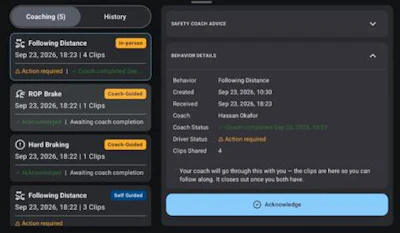
· PS Coach: Part of PS Visual Intelligence, PS Coach closes the loop between detecting a safety event and changing driver behavior. Safety managers get a per-driver coaching inbox that surfaces unaddressed behaviors and lets them deliver coaching self-guided to the driver’s device or live through a coach-led session, phone call, text, or in-person conversation. Every interaction carries a permanent, time-stamped acknowledgment record, a cross-driver dashboard flags overdue behaviors, and full coaching history can be exported for DOT audits or litigation support. A team of two or three safety managers can coach thousands of drivers without sacrificing documentation, while drivers review and acknowledge coaching on their own time through the PS Driver App or in-cab tablet.
· PS Truck Tracker: PS Truck Tracker lets an authorized dispatcher generate a secure, self-expiring link that shows a single vehicle’s live location on a map, with no login, account, or app required for the recipient. Customers and receiving docks get real-time visibility to prepare for an arrival, dispatchers cut down on “where’s my truck?” calls, and fleets offer delivery transparency without exposing their route network or other vehicles. Administrators control who is authorized to generate links.
· Vehicle Settings for PS Visual Intelligence: Vehicle Settings gives fleet administrators self-service control over safety event detection and driver privacy settings on their video devices – changes that previously required a request to Platform Science. Admins can tune detection sensitivity for harsh braking, following distance, fatigue, and phone usage, and configure privacy controls such as camera behavior while parked or a physical in-cab privacy button. Changes are staged as drafts, reviewed in a single summary, and deployed to vehicles in one action, with dedicated roles controlling who can view versus edit configuration.